Access insights specific to your Kubernetes environments through the Kubernetes Costs page. This feature leverages New Relic's telemetry data to provide a detailed view of the costs associated with your Kubernetes clusters.
Use the Kubernetes Costs page to view costs incurred by each application over time and detailed cost analysis.
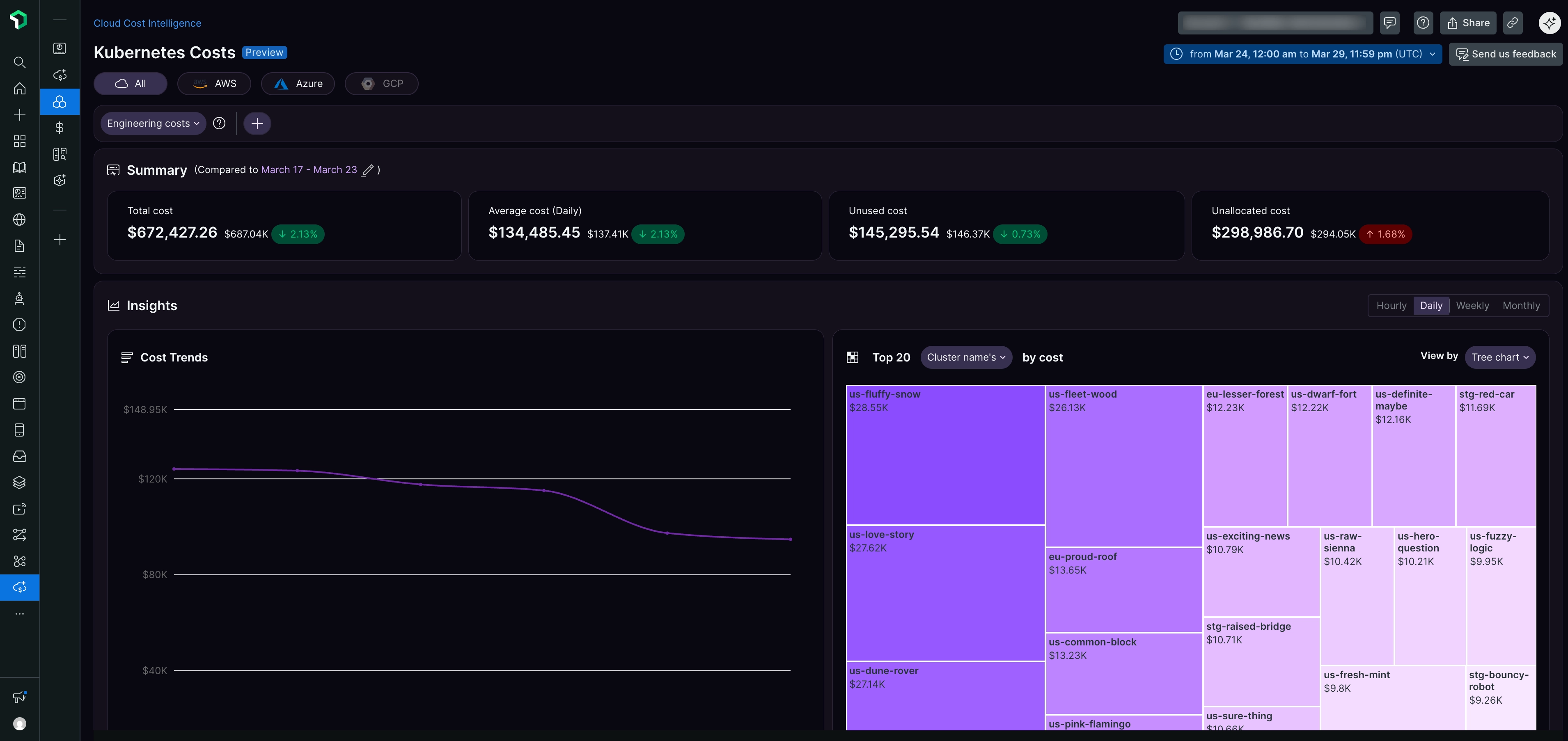
Filters and customization
Cloud provider filters
To filter your cost data by cloud provider, select an option from the dropdown menu at the top left of the page:
- All: All cloud providers
- AWS: Amazon Web Services only
- Azure: Microsoft Azure only
Date range selector
At the top right of the page, use the date range selector to:
- Choose a predefined time period
- Set custom start and end dates
- View costs in your preferred timezone (UTC displayed by default)
Engineering costs filter
If your organization uses cost allocation tags, you can filter by the Engineering costs tag to narrow analysis to specific teams, projects, or cost centers tagged in your cloud environment.
Summary
The Summary section displays four key cost metrics for your selected time period:
- Total cost: The aggregate spending for all Kubernetes clusters with percentage change compared to the previous period
- Average cost (Daily): The daily average spending with percentage change
- Unused cost: The cost of resources that have been allocated but are not receiving any requests, with percentage change
- Unallocated cost: The cost of cluster resources that have not been allocated to any source, with percentage change
Insights
The Insights section provides two visualization widgets to help you analyze your Kubernetes costs.
Cost Trends
The Cost Trends widget displays a line chart showing how your Kubernetes costs change over time. Use the view options to switch between Hourly, Daily, Weekly, or Monthly views.
Top 20
The Top 20 widget displays your highest cost areas using a tree chart visualization. By default, it shows the top 20 clusters by cost. You can customize the view using:
- Dropdown filter: Select what to display (Cluster name, by cost)
- Group by: Choose dimensions to group cost data
- View by: Switch between Tree chart and other visualization formats
Cost & Usage Analysis
The Cost & Usage Analysis section presents a detailed table with a breakdown of resource usage and costs by cluster name:
- Cluster name: The name of your Kubernetes cluster
- CPU cost: The cost attributed to CPU usage for each cluster
- CPU usage: The percentage of CPU resources consumed by each cluster
- Memory cost: The cost associated with memory usage
- Memory usage: The memory resources by percentage used by each cluster
- Unused Cost: The cost of allocated but unused resources
- Unallocated cost: The cost of cluster resources not allocated to any source
- Total cost: The total cost incurred by each cluster, integrating all resource usage (sortable)
Understand unused and unallocated costs
These cost dimensions help you measure cluster efficiency:
Unused cost
Unused cost represents resources that have been allocated but are not receiving any requests.
Example: If your total cost is $5.60 allocated to a cluster deployment, but you're only using $4.64, then $0.96 is unused cost.
Unallocated cost
Unallocated cost represents cluster resources that have not been allocated to any source.
These metrics help you identify opportunities to improve cluster efficiency and reduce waste.
ヒント
Select any cluster to view its Cost Trends, Cost Breakdown (Total vs Used), and detailed information about unused and unallocated costs.
Benefits
The Kubernetes Cost Insights feature delivers these outcomes:
- Optimized resource usage: Visibility into underutilized or excessively costly clusters enables effective resource allocation adjustments
- Controlled expenses: Insights into specific cost drivers within your Kubernetes environment enable more informed financial decisions
- Enhanced efficiency: Resource management strategies aligned with business objectives ensure efficient use of cloud resources
The Kubernetes Costs page provides the insights necessary to proactively manage Kubernetes costs, supporting strategic decision-making and financial optimization.